


T-Mobile Visual Voicemail
3.140.33K Reviews
App Specs
- Version
- 10.7.0.784475
- Updated On
- License
- Free
- Downloads
- 100,000,000+
- Developer
- T-Mobile USA
- Categories
- Communication
- Platform
- Android
Screenshots

 Analysis by AppCompare
For a household where one person handles most calls, voicemail can become a small but persistent coordination problem. I find T-Mobile Visual Voicemail most useful when I need to see which missed calls deserve attention without dialing in and listening to a queue. It is a focused communication app from T-Mobile USA, and its appeal is practical rather than flashy: it puts voicemail messages in a more manageable format.
That focus also sets a boundary. This is not a shared family inbox or a way to combine several people’s messages. Each person should use the voicemail associated with their own T-Mobile service and account. For a parent, partner, or household member who often checks messages on someone else’s phone, that distinction matters: the convenience belongs to the account holder, not automatically to everyone in the home.
When missed calls affect the whole household
A realistic example is a day when I am driving between errands and miss calls from a school, a repair person, and a relative. Later, I can look through the voicemail list and decide what needs a prompt reply rather than calling in and replaying messages in sequence. If a message includes a time, name, or request, playback controls make it easier to pause and catch the detail. A visible message list can make this kind of sorting less disruptive than handling every notification as it arrives.
That workflow is useful even when the phone is not shared. A person who coordinates appointments for a household can quickly identify which messages to return first, then pass along the relevant information themselves. I would not treat the app as a substitute for a shared calendar or a family messaging thread, though. It helps the account holder manage incoming voicemail; it does not create a common record that everyone can see.
The distinction becomes especially important when several people use one device. Opening someone else’s voicemail can expose personal messages, and the app does not turn a shared phone into a neatly separated inbox for different family members. If multiple people need access, I would agree on whose account is active and who is allowed to listen before making this the household’s routine. For most homes, separate phones and accounts are the clearer arrangement.
Getting Started with Ease
Setting up the T-Mobile Visual Voicemail app is pretty straightforward. After downloading it from the app store, the installation process is smooth and quick. Once it's up and running, you'll be prompted to enter your T-Mobile login credentials. What I love about this app is that it automatically syncs with your phone, pulling in all your missed calls and voicemails in one go. No need to fiddle around with settings—it's ready to roll right from the start.
Because setup involves T-Mobile credentials, I would treat it as a personal-account setup, not a casual step for whoever happens to be holding the phone. Before installing it on a shared device, check which account is signed in and whether that is the account whose messages should appear. If the phone is passed between adults, signing in without discussing that boundary could lead to an awkward surprise when private messages show up in the list.
Worth Reading Before You Choose

Flipboard Shows What News Apps Must Do Beyond the Feed

Switching to Android Auto Means Rethinking Your Driving Routine

Google Calendar Makes a Crowded Week Easier to Manage

Ludo King Makes the Most of the Minutes Between Plans

Baby Panda World Brings Quick Play to Modern Phones, but Its Game Library Feels Busy

ESPN’s Live Game View Makes Following Close Games Easier
The app is free, and its broad reach is reflected in more than 100 million installs. It has been available since November 22, 2010, and the current version is 10.7.0.784475. Those figures suggest a long-running utility rather than a new messaging platform, which is exactly how I would approach it: a practical companion to T-Mobile voicemail, not a replacement for a household’s other ways of staying in touch.
Intuitive Design and User-Friendly Interface
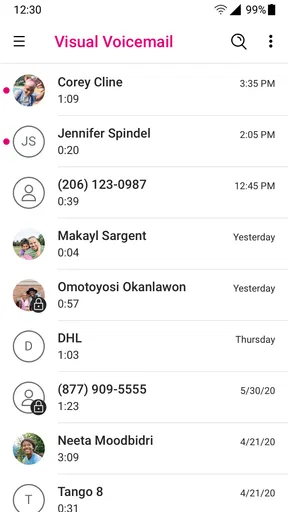
The first thing you'll notice is the clean and intuitive interface. Everything is laid out simply, making it easy to navigate even if you're not particularly tech-savvy. The main screen displays your voicemails neatly, and they're organized by caller name and time received. No more dialing in to hear each message one by one—just tap on a message to listen.
That list is most helpful when I have several messages and only a short window to deal with them. Caller and time give me a first clue about urgency, but they are not a reliable substitute for listening: a familiar caller can leave something routine, while an unfamiliar number could be important. My useful habit is to scan the list, listen to the messages that seem time-sensitive, and return to the rest when I can give them proper attention.
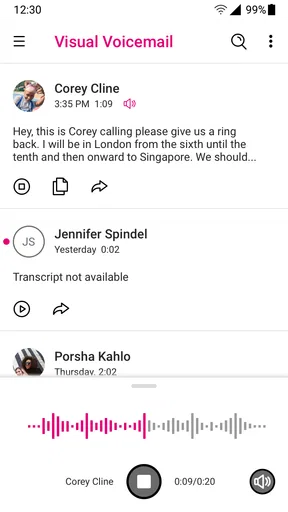
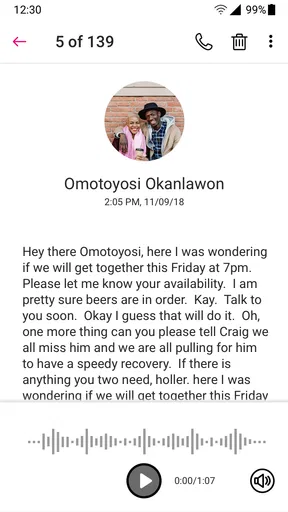
And speaking of listening, the app offers playback controls that are super handy. You can pause, rewind, or fast-forward through messages. This feature comes in clutch when you need to jot down important details from a voicemail.
There is a small but worthwhile trade-off here. A message list makes navigation easier than traditional dial-in voicemail, but the actual content still depends on the caller leaving a clear message. When someone speaks quickly or gives several details at once, I still need to replay a section and verify what I heard before acting. I would not rely on a quick listen for information that needs to be exact, such as a complicated time or address.
Transcriptions for the Win
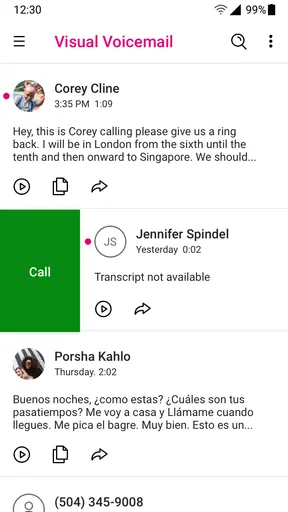
One of the standout features is the voicemail transcription. Sometimes, listening to a message isn't ideal, especially if you're in a meeting or a noisy environment. The app transcribes your voicemails into text, which is surprisingly accurate most of the time. You can read through your messages at your convenience, making it easier to prioritize which ones to respond to first.
For me, transcription works best as a preview, not a final record. In a quiet moment, text can quickly show whether a caller is asking for a callback or leaving a straightforward update. In a noisy place, it can help me decide whether I should step somewhere quieter to listen. But if a name, number, or appointment detail looks odd, I go back to the audio rather than guessing from the text. That is especially sensible when the caller has an accent, speaks rapidly, or leaves a muffled message.
This also shapes how I would use it around other people. A transcription can be easier to glance at discreetly than playing audio aloud, but discreet is not the same as private: someone looking over your shoulder may still read the message. If a voicemail is sensitive, I would wait until I am somewhere comfortable before opening it, and use headphones or listen later rather than assuming that text makes it safe to review in public.
Customization Options Galore
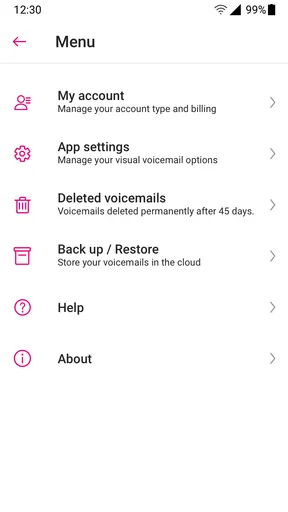
Another aspect I appreciate is the level of customization the app offers. You can set up personalized greetings, which adds a nice touch for business or personal use. Plus, notifications can be tailored to your liking—choose to get alerts for every new voicemail or just let them pile up silently until you’re ready to check them. It’s all about making the app work for you.
For a household, the greeting is a small detail with practical value. If the phone is used for work as well as personal calls, a greeting that clearly identifies the person or purpose can help callers know they reached the right place. I would keep it simple and avoid putting private household details in a message that callers may hear. The app’s greeting option is useful for setting a tone, but it does not make a personal line into a professionally managed shared line.
Notification choices are also a matter of routine. Immediate alerts suit someone who is waiting for an important callback, while quieter notifications may be less distracting for a person who checks messages at set times. If several people share a device, I would be cautious about enabling alerts that reveal a new voicemail on the lock screen or draw another user into the account holder’s messages. The best setting depends not just on convenience but on who can see the phone.
Performance and Reliability
In terms of performance, the app runs smoothly without any noticeable lag. I've been using it for a couple of weeks now, and it hasn’t crashed or frozen on me once. It’s reliable, and the voicemail delivery is prompt, so you’re not left waiting for messages to appear.
Even with a smooth experience, I would keep the usual distinction between a notification and confirmation. If I am waiting on a time-sensitive message, I check the app directly when it matters rather than assuming that an alert alone means I have the full picture. For everyday calls, the organized inbox is convenient; for an urgent household change, I would still use a direct call or message to make sure the right person sees it.
Compared with dialing into voicemail, the app is easier for browsing and selecting a particular message. Compared with a general messaging app, it is narrower: it is built around voicemail tied to T-Mobile service rather than conversations, group coordination, or shared task tracking. That narrowness is a strength if all I want is a clearer way to handle missed calls, and a limitation if I expect one app to coordinate everyone in a home.
Room for Improvement
While the app is excellent overall, there's always room for improvement. For instance, the transcription feature, though great, isn't perfect. There are times when it misses out on specific words, especially if the caller has a thick accent or speaks quickly. Also, the app is exclusively for T-Mobile users, so if you're not on their network, you're out of luck.
The network boundary is the first reason I would tell someone to skip it: if their service is not with T-Mobile, this is not the right voicemail tool for them. The second is expectation. It is not a cross-carrier inbox, and it will not gather voicemail from several household accounts into a shared dashboard. Someone comparing it with broader communication platforms should choose those for group conversations and coordination, while using this only for the T-Mobile voicemail task it is meant to handle.
Another thing I noticed is that the app doesn’t offer any integration with other services or apps. It would be awesome to see future updates that allow for seamless syncing with cloud storage or third-party voicemail services.
That lack of integration changes how I would keep important information. If a caller leaves instructions that other people in the home need, I would listen, confirm the details, and then share them through the family’s usual channel instead of assuming the voicemail will appear in a shared calendar or cloud folder. It is one extra step, but it avoids treating a private voicemail inbox as a household coordination system.
Parents may also wonder whether this is suitable for a child. The app’s content rating is Everyone, and it is a communication utility, but that does not mean it provides parental controls or separate family profiles. I would make the decision based on the child’s own phone and account arrangements, and talk through how to handle unfamiliar callers and private messages. The age label describes the general content context; it does not replace household rules about phone use.
Who It Suits—and Who Should Look Elsewhere
I would recommend it most readily to a T-Mobile customer who receives useful voicemail and wants a quicker way to review it than dial-in playback. It is particularly handy for people who move between work, errands, and home, or who cannot always listen to messages as soon as they arrive. The ability to scan, select, and replay gives them more control over when they handle calls.
I would be less enthusiastic for someone who rarely receives voicemail, relies entirely on text, or needs a shared mailbox for a team or family. In those cases, the app may add another place to check without solving the real coordination need. Someone who needs every message forwarded, archived elsewhere, or combined across carriers should compare options designed for those workflows rather than expecting this app to provide them.
The app is rated 3.0 on average, based on around 94,000 ratings and 40,000 reviews. I take that as a reason to set realistic expectations, not as a verdict on every individual experience. For a basic T-Mobile voicemail workflow, the interface and playback controls are appealing; the value will depend on how consistently the app fits a person’s device, account, and notification habits.
Age, Trust, and Account Boundaries
For adults sharing household responsibilities, a useful rule is to separate access from coordination. The account holder can use the app to review their own messages and then relay what matters. That is different from handing over credentials or leaving voicemail open for another person to browse. I prefer the first approach because it respects personal messages while still allowing the household to act on practical information.
If a shared phone is unavoidable, decide in advance whose T-Mobile account is connected and whether the phone is meant to receive private calls. A quick check after setup can prevent messages from being mistaken for another person’s. I would also avoid treating a notification preview as permission for everyone nearby to read the content. The app makes voicemail easier to reach, so ordinary care about who can see the screen matters more, not less.
Final Thoughts
All in all, the T-Mobile Visual Voicemail app is an excellent tool for anyone looking to streamline their voicemail management. It’s user-friendly, efficient, and full of features that make checking voicemails less of a chore. If you're a T-Mobile user, this app is definitely worth a download. It’s not perfect, but it’s darn close.
So, if you’re tired of the old-school way of checking voicemails, give this app a shot. It's a small change that can make a big difference in how you handle missed calls.
For a household, my recommendation is more specific: use it as a personal inbox that makes one person’s missed calls easier to manage, then pass along useful details through the household’s normal communication routine. It is free, intended for Everyone, and requires Android 8.0 or later, so an older device may not be a fit. If that matches your phone and carrier, it is a sensible convenience; if your priority is shared access, cross-carrier coverage, or centralized family coordination, a different tool will serve that need better.
Pros
- Easy setup and user-friendly interface.
- Efficient voicemail management features.
- Supports multiple languages.
- Push notifications for new messages.
- Integrated with contacts for quick access.
Cons
- Limited functionality on non-T-Mobile networks.
- Occasional sync delays reported.
- Requires T-Mobile account for full features.
- Ads can be intrusive in free version.
- No transcription feature in basic version.
FAQs for T-Mobile Visual Voicemail
What is T-Mobile Visual Voicemail and how does it work?
T-Mobile Visual Voicemail is an app that allows users to manage their voicemail messages visually on their smartphones. Instead of calling a voicemail number, you can see a list of your messages, listen to them in any order, and even read transcriptions of the messages if available. This makes managing voicemail more efficient and convenient.
Is T-Mobile Visual Voicemail free to use?
Yes, T-Mobile Visual Voicemail is a free app available to T-Mobile customers. However, some features, such as voicemail-to-text transcription, may incur additional charges depending on your T-Mobile plan. It’s always a good idea to check with T-Mobile for any potential costs associated with enhanced features.
Which devices are compatible with T-Mobile Visual Voicemail?
T-Mobile Visual Voicemail is compatible with most Android and iOS devices. To ensure compatibility, your device should be running a recent version of Android or iOS. You can check the compatibility and download the app directly from the Google Play Store or Apple App Store.
How do I set up T-Mobile Visual Voicemail on my phone?
Setting up T-Mobile Visual Voicemail is straightforward. After downloading the app from the respective app store, open it and follow the on-screen instructions. You will need to grant necessary permissions, such as access to your voicemail and contacts, to fully utilize the app’s features. Ensure your phone is connected to the T-Mobile network for setup.
What should I do if I encounter issues with T-Mobile Visual Voicemail?
If you experience issues with T-Mobile Visual Voicemail, first ensure your app is updated to the latest version. Restart your phone and check network connectivity. If problems persist, contact T-Mobile customer support for assistance. They can help troubleshoot and resolve any technical difficulties you may be facing.


